

Welcome to the Help Center
Get quick answers to your questions about Scholarship Region
How to track a scholarship application
Applying for scholarships is the step that puts you on track to win a scholarship. Tracking your applications helps you stay informed about the performance of your submissions. Instead of waiting in the dark to get an update about your application, you can now see how your application progresses in real-time with Scholarship Region.
To take advantage of this feature, you must be a registered user of Scholarship Region. You can create an account here. Once you are logged in, follow these steps to start tracking your application:
Navigate to ‘Scholarships’ section.
Look for the scholarship that you have applied for and want to track.
Click into the scholarship detail and find ‘Application Tracker’ section on the page.
By default, the status will be ‘Not Applied’. If you have applied for it, change the status to ‘Applied’.
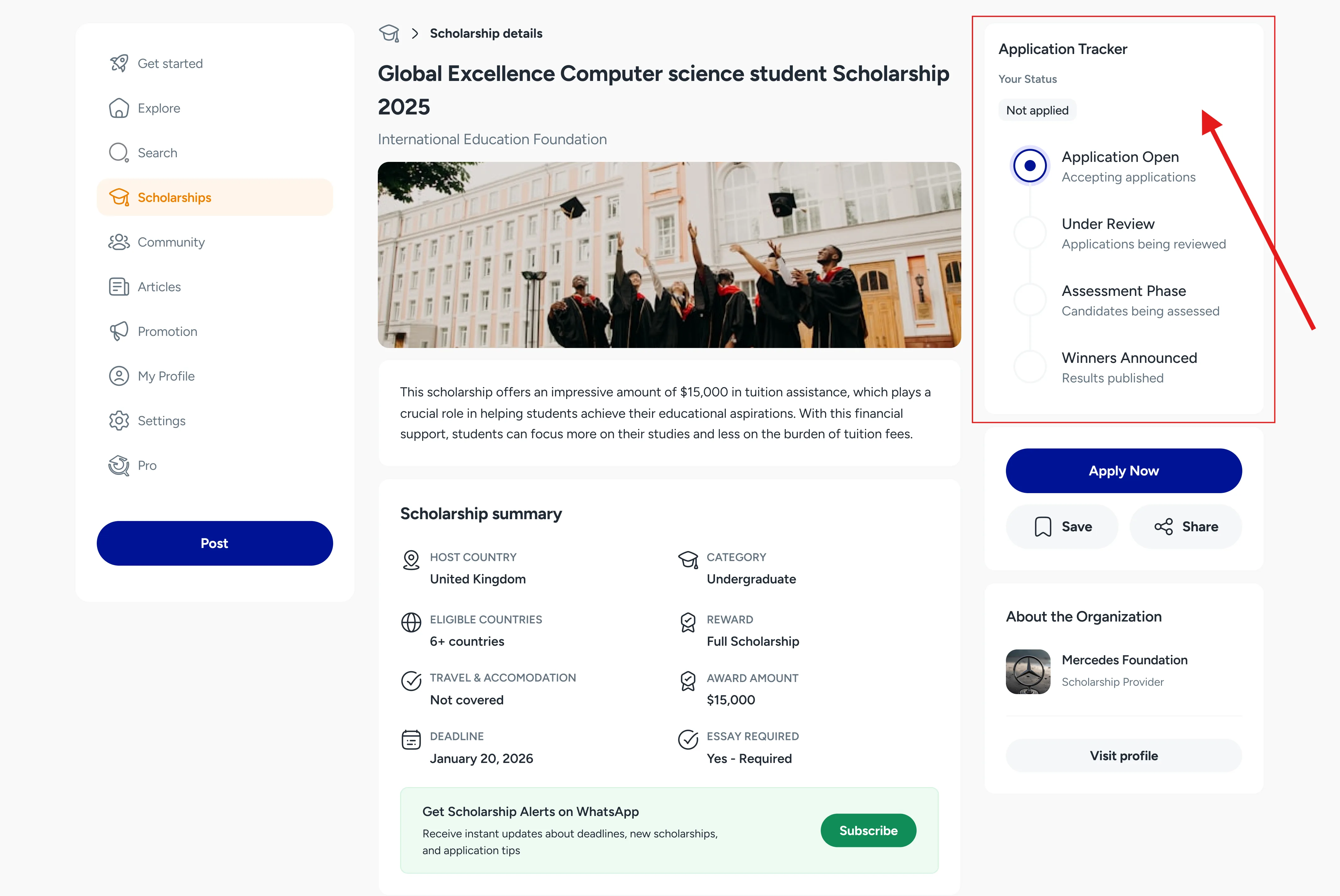
Note: If the application for the scholarship is collected on Scholarship Region, you don’t need to perform any action, the Application tracker will activate itself automatically.
Once the status is ‘Applied’, the Application tracker will start receiving updates. You can visit the page again to check for updates.
Did you find this article helpful?